API
Authenticate, create cards, upload files, and build reliable Teak integrations
Teak provides a public REST API for saving, querying, and syncing cards. Use this guide for integration decisions and the generated reference for every operation, field, schema, and code sample.
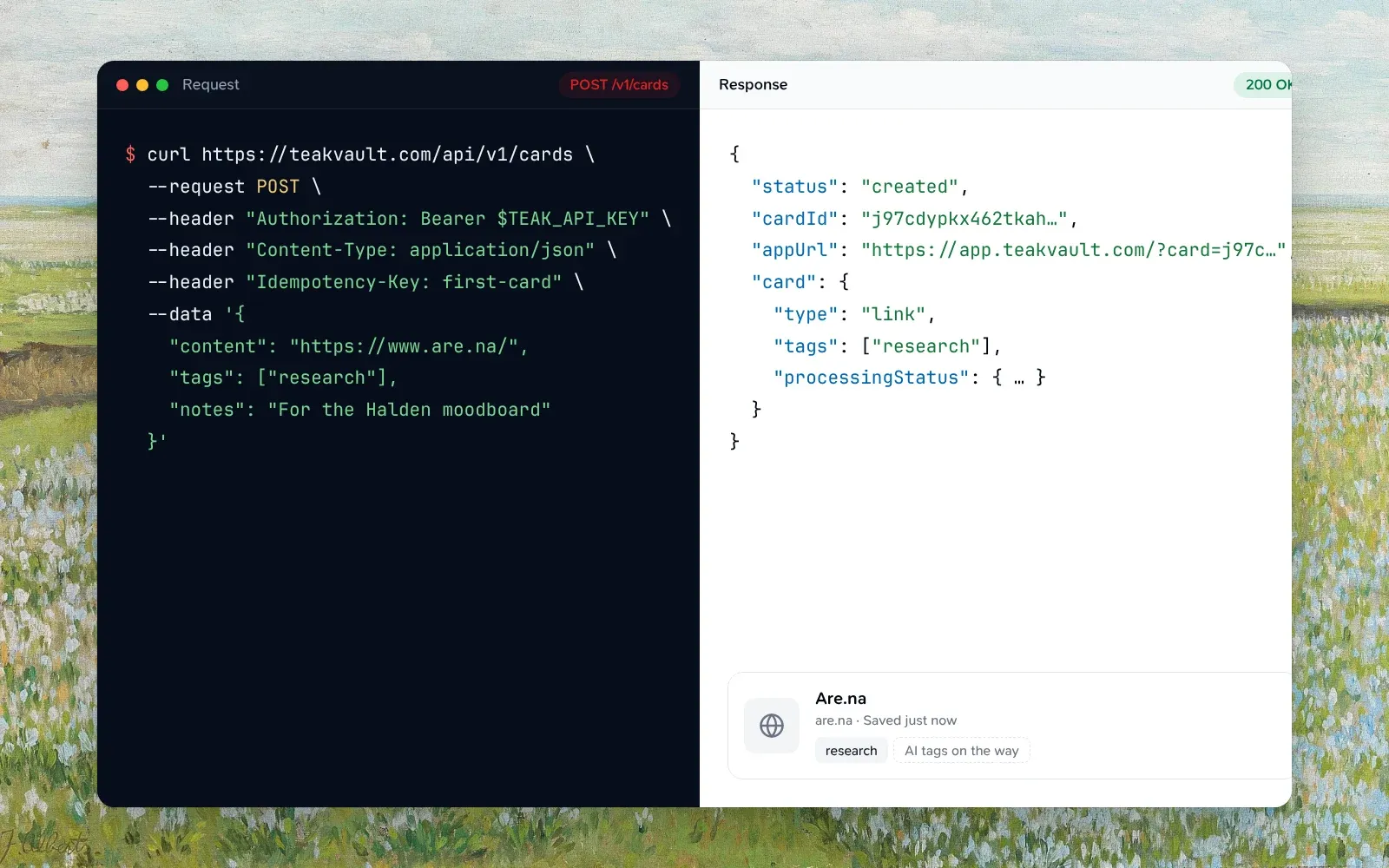
Quickstart
Check your key and save a first card with a live request form.
API Reference
Explore the complete OpenAPI contract with samples in curl, JavaScript, TypeScript, Python, Go, and more.
MCP
Connect an AI client to Teak through its remote MCP server.
Base URL
Production: https://teakvault.com/api/v1
The machine-readable OpenAPI document is available at https://teakvault.com/api/openapi.json. Local development URLs are in the Development guide.
Authentication
Every API request uses a bearer token in the Authorization header.
Generate a long-lived teakapi_ key in Teak Settings → Integrations → API keys. Each account can have
up to 10 active keys, and new keys can be created at most five times per
minute. Use Revoke all keys if you need to clear every key, including any
that no longer appear in the list.
Authorization: Bearer teakapi_...Native clients using browser sign-in send short-lived OAuth access tokens instead — see Development.
Browser-based OAuth clients can discover the active server from /.well-known/oauth-protected-resource/mcp, then read its /.well-known/oauth-authorization-server document. Teak publishes first-party client IDs, the matching issuer, its authorize and token endpoints, and the MCP resource in one document at /.well-known/teak-oauth-clients.json. These documents change only when the deployment does, and may be cached for five minutes. The shared SDK’s discoverAuthServer(siteUrl) reads that one document and caches a validated result for up to 60 seconds; use { forceRefresh: true } after sign-in or refresh failures. Discovery never sends an access token. For a cloud development backend with a local sign-in server, pass its explicit loopback origin as localIssuer; remote metadata cannot enable loopback access by itself.
Request https://teakvault.com/api as the OAuth resource. REST requests require a Connect user access token with that exact audience. AuthKit session tokens and tokens issued for https://teakvault.com/mcp are rejected.
Development and self-hosted deployments can use their own resources. The API resource is /api on the origin of the MCP resource that the deployment’s /.well-known/oauth-protected-resource/mcp lists. On the development deployment that is https://<deployment>.convex.site/api, and the MCP resource is https://<deployment>.convex.site/mcp. The SDK’s createConnectAuthorizeUrl and requestConnectTokens derive it from discovery for you.
Disconnect an OAuth connection
Send POST /v1/oauth/disconnect with your Connect API access token as the bearer credential and no body. A 204 confirms that this app is disconnected across all its installations and resources. Other apps stay connected. Repeating a completed request succeeds. Keep saved credentials until you receive 204. Reconnecting can take about 15 minutes while previously issued access tokens expire.
A new disconnect requires a current access token. A correctly signed expired token can retry a completed disconnect or resume its acknowledged cleanup, but cannot access cards. On 401, refresh using the same issuer, client and resource, save the rotated credentials, then retry once. Temporary verification, provider or storage failures return 503; preserve credentials for retry. API keys, refresh tokens, AuthKit sessions, and MCP-audience tokens cannot use this endpoint.
Read your identity
GET /v1/me accepts an API key or OAuth access token. Invalid, expired,
revoked, or deleted-account credentials return 401. Responses are not cached.
dataobjectrequiredThe authenticated account.
properties
idstringrequiredYour stable Teak owner ID.
emailstringrequiredThe account’s email address.
namestringThe account’s display name, when set.
cardCountnumberrequiredCards outside Trash.
cardLimitnumber | nullrequiredThe Free plan’s card limit, or null on Pro.
planstringrequiredfree or pro.
localestringrequiredThe language you chose in Teak’s Settings, as a code such as en,
de or pt-BR; en until you choose one. Teak may add languages, so
treat a code you don’t know as English. The API can’t change it.
settingsUrlstringrequiredTeak’s web Settings, where you manage your plan, API keys, and imports.
Create your first card
curl https://teakvault.com/api/v1/cards \
  --request POST \
  --header "Authorization: Bearer $TEAK_API_KEY" \
  --header "Content-Type: application/json" \
  --header "Idempotency-Key: first-card" \
  --data '{
    "content": "# Project notes\n\nKeep the original spacing.",
    "cardType": "text",
    "tags": ["project"]
  }'
const response = await fetch("https://teakvault.com/api/v1/cards", {
method: "POST",
headers: {
Authorization: `Bearer ${process.env.TEAK_API_KEY}`,
"Content-Type": "application/json",
"Idempotency-Key": "first-card",
},
body: JSON.stringify({
content: "# Project notes\n\nKeep the original spacing.",
cardType: "text",
tags: ["project"],
}),
});Create behavior
cardType is optional. Set it to text to preserve raw Markdown exactly, even when the content looks like a URL, quote, or color. When omitted, Teak automatically detects links, quotes, and palettes.
An explicit cardType must fit the card. image, video, audio, and document need an uploaded file (see Upload files), and palette needs at least one color Teak can read, such as #ff5500. Each tag can be up to 64 characters. A rejected request returns 400 INVALID_INPUT with an error message that names the problem.
sourceUrl and sourceTitle record the page a card came from, such as the page a quote was selected on. Unlike url, sourceUrl never turns text into a link, and the duplicate check (GET /v1/cards/duplicate) ignores it. It must be an http or https URL of at most 2,048 characters; sourceTitle is trimmed and cut to 300 characters, and needs a sourceUrl. Both are set only when the card is created, come back on the card, and are included in exports. site: matches the page’s site when the card has no url of its own. They are separate from source, a free label for what saved the card.
{
  "content": "Simplicity is a great virtue, but it requires hard work to achieve it.",
  "cardType": "text",
  "sourceUrl": "https://example.com/essays/simplicity",
  "sourceTitle": "On simplicity"
}cardType?CardType
Optional card type: `text`, `link`, `image`, `video`, `audio`, `document`, `palette` or `quote`. Set it to `text` to store raw Markdown exactly; omit it to keep automatic URL, quote, and palette detection.
CardTypeinferredcontent?string
Markdown or plain text body for the card. Prefer this for notes; use `url` when saving a link.
stringnotes?string | null
Free-form notes attached to the card.
string | nullpageSnapshotKey?string
The `fileKey` from `pageSnapshots.createUpload`: the page as the browser showed it, which becomes a link's saved copy. Ignored when it isn't one of your snapshot uploads.
stringsource?string
A free label for what saved the card (extension, CLI, API, and so on), kept in its metadata. For the page the card came from, use `sourceUrl`.
stringsourceTitle?string
The page's title, beside `sourceUrl`; cut to 300 characters.
stringsourceUrl?string
The page the card came from, such as the page a quote was selected on: an http or https URL of at most 2,048 characters. Unlike `url`, it never makes the card a link.
stringtags?string[]
Tags to apply on create.
string[]url?string
URL to save as a link card. Teak may classify the type automatically when `cardType` is omitted.
stringA create response includes the new cardId and its Teak app URL. See Create Card in the API Reference for the complete request and response schemas.
Saving a link again
Saving a link you already have makes no second card. When the save is just a link (url, or content that is only the link) and a card outside Trash has the same link, ignoring the differences the duplicate check ignores, that card moves to the top of sort=newest and comes back from Archive. The response is still 200 with status: "created", plus resaved: true and, when the card was archived, wasArchived: true. cardId and card are the existing card, whose savedAt is now the time of the save.
{
  "status": "created",
  "resaved": true,
  "wasArchived": true,
  "cardId": "k57...",
  "appUrl": "https://app.teakvault.com/?card=k57...",
  "card": { "id": "k57...", "createdAt": 1735689600000, "savedAt": 1761300000000 }
}- Tags, notes and content sent with a re-save are not applied. Check
resavedandPATCHthe card to add them. - A re-save counts toward the limit of 30 new cards a minute, but not toward the free plan’s card limit, so it works at 200 of 200 cards.
- A link with other words in
content, atextcard, a quote and an upload always make a new card, as does a link whose only match is in Trash. - The card is not processed again.
- Retrying with the same
Idempotency-Keyreturns the first response.
Every card has savedAt: when it was last saved. It starts equal to createdAt, which stays the date it was first saved, and moves forward with each re-save. sort=newest and sort=oldest order by savedAt, and /v1/cards/changes reports a re-save through updatedAt. In POST /v1/cards/bulk, a create item whose link is already saved succeeds with resaved: true and the existing card’s cardId; the same link twice in one request makes one card, and the second item re-saves it.
Edit a card
Send changed fields to PATCH /v1/cards/:cardId: content, notes, tags,
url, metadataTitle, removeAiTags, addColors, or removeColors. Titles work for every card type, are trimmed, and
keep up to 512 characters; a longer title is cut to 512. Send null or a blank title to clear it.
Omit metadataTitle to preserve the existing title. Metadata processing
preserves titles you edit or clear.
Every field in a request is checked before anything is saved, so an invalid
field leaves the card unchanged, and the error names the field and what’s wrong
with it. Changing content or url queues the card
for processing again, which each card does at most once a minute; changing both
in one request counts once. Changes within the minute still save right away,
and one more processing run follows when the minute is up.
A link with highlights keeps the URL its saved copy came from: changing its url returns
409 CONFLICT until the highlights are removed.
tags replaces your own tags; each can be up to 64 characters. To drop tags Teak added, send them in
removeAiTags, for example { "removeAiTags": ["inspiration"] }. They match
ignoring case, and tags Teak didn’t add are ignored. The response is the updated card, including its
processingStatus.
A palette card’s colors change with addColors and removeColors, each a list of 1 to 12 hex codes
(#FF5500, f50, with or without #), for example { "addColors": ["#2A9D8F"] }. Colors are saved
as #RRGGBB; an eight-digit #RRGGBBAA in addColors keeps its alpha, as palettes saved from text
can, and counts as its RGB color. Color search finds the card by them right away. In removeColors,
name a color by its RGB. A card’s colors list each color’s
hex, with a name only when the color has a common one (#FF0000 is red; #2A9D8F has none). A color
the palette already has is skipped, removing one takes every copy, and colors it doesn’t have are
ignored. Removes apply first, so one request can swap a color. A palette holds up to 12 colors and
keeps at least one; past either limit, or for a card that isn’t a palette, the request fails with
400 and changes nothing. Changing colors doesn’t process the card again.
Upload files
File cards use a direct upload flow, so large bytes never pass through the REST API.
Create an upload
Send the file name, media type, and size to POST /v1/uploads.
Upload the bytes
PUT the file to the returned presigned URL and retain its ETag response header.
Create the card
Send the returned fileKey, retained fileEtag, and file metadata to POST /v1/cards.
Files can be up to 100 MB. Uploaded .md and .markdown files become editable text cards, must contain valid UTF-8, and are limited to 512 KiB. .mdx remains a document.
Supported uploads include common image, audio, video, source, design-token, document, archive, and Figma formats. The API Reference is the canonical source for accepted fields and validation responses.
Reliable requests
Idempotency-KeyheaderstringSafely retries card creation and bulk operations without duplicating work.
Sending the same key while its first request is still running returns
409 IN_PROGRESS with Retry-After; send it again then for the first
response. The same key with a different request body is 409 CONFLICT.
X-Request-IdstringReturned for support and log correlation.
Retry-AfterstringSeconds to wait before retrying. Sent with 429 responses, along with
RateLimit-Remaining and RateLimit-Reset (also in seconds), and
RateLimit-Limit when the limit is known. 503 SERVICE_UNAVAILABLE responses
mean the service was briefly busy; they also carry Retry-After.
Bulk operations accept up to 100 items. Each item succeeds or fails on its own,
and a failed item changes nothing; its result has a code and an error.
Bulk operations don’t accept permanent.
Cursor-based listing and the card changes endpoint are available for integrations that need complete pagination or incremental sync.
Sync changes
GET /v1/cards/changes?since=<timestamp> returns cards updated at or after
since in items, and the IDs of cards moved to Trash or permanently deleted
in deletedIds. Page with pageInfo.nextCursor until hasMore is false,
then use the time you started as the next since. Permanent deletions are kept
for 90 days: if your last sync is older than that, start again from since=0
and replace your local copy.
Endpoint overview
| Route | Purpose |
|---|---|
/v1/me |
Read your authenticated Teak identity |
/v1/cards |
Create or list cards |
/v1/uploads |
Start a direct file upload |
/v1/page-snapshots/upload |
Start uploading the page a link was saved from, for its saved copy, with POST |
/v1/cards/bulk |
Create, update, favorite, archive, tag, delete, or restore up to 100 cards |
/v1/cards/changes |
Read incremental card changes |
/v1/tags |
List tags |
/v1/tags/rename |
Rename a tag on every card with POST |
/v1/tags/merge |
Merge one tag into another on every card with POST |
/v1/tags/delete |
Remove a tag from every card with POST |
/v1/tags/operations/:operationId |
Read a tag change’s progress |
/v1/folders |
List folders or create one |
/v1/folders/:folderId |
Read, rename, recolor, or delete one folder |
/v1/folders/:folderId/cards |
Add cards to a folder with POST, or remove them with DELETE |
/v1/folders/:folderId/rule-runs/:runId |
Follow a folder rule run with GET, or undo it with POST to /undo |
/v1/cards/:cardId |
Read, update, or delete one card |
/v1/cards/:cardId/restore |
Restore one card from Trash with POST |
/v1/cards/:cardId/content |
Read one card’s full text: its document’s text, its transcript, or with ?kind=article a link’s article as Markdown |
/v1/cards/:cardId/refresh |
Refresh one card’s summary, tags, and link preview with POST |
/v1/cards/:cardId/thumbnail/upload |
Start uploading a new image for a link card with POST |
/v1/cards/:cardId/thumbnail |
Use an uploaded image as a link card’s image with PUT, or reset it with DELETE |
/v1/cards/:cardId/favorite |
Favorite or unfavorite one card |
/v1/cards/:cardId/pin |
Pin one card to the top of the library, or unpin it, with PATCH |
/v1/cards/pinned/order |
Set the pinned cards’ order with PUT |
/v1/cards/:cardId/done |
Mark a link done with POST, or not done with DELETE |
/v1/cards/:cardId/save-pdf |
Save an arXiv link’s PDF as a document card with POST |
/v1/cards/:cardId/highlights |
List a link’s highlights, or highlight a passage by its text with POST |
/v1/highlights/:highlightId |
Change a highlight’s note with PATCH, or remove it with DELETE |
/v1/cards/duplicate |
Check whether a URL is already saved |
/v1/exports |
Start a ZIP export of your cards with POST |
/v1/exports/latest |
Read the latest export and its download link |
/v1/oauth/disconnect |
Disconnect an OAuth app with POST |
See the OpenAPI document at https://teakvault.com/api/openapi.json or the API Reference for methods, parameters, schemas, and response examples.
Every card, tag, folder, and account endpoint is also a tool in the MCP server, a method in the TypeScript SDK, and a command in the CLI, with the same filters and error codes. Exports are the exception for MCP: an export is a ZIP of your whole library for you to download, so agents read cards a page at a time instead. Page snapshots are SDK-only (pageSnapshots.createUpload): they carry the page a browser shows, which only a browser extension has.
Pinned cards
Pin up to 12 cards to keep them at the top of the library. Every card has
isPinned.
PATCH /v1/cards/:cardId/pinwith{ "isPinned": true }pins a card, orfalseunpins it, and returns the card. A new pin goes first. Pinning a 13th card fails with400 PIN_LIMIT_REACHED, and an archived card can’t be pinned (409 CONFLICT). Pinning a pinned card, or unpinning one that isn’t, changes nothing.GET /v1/cards?pinned=true(orq=is:pinned) lists the pinned cards. With no search it returns them first to last, as one page.PUT /v1/cards/pinned/orderwith{ "cardIds": [...] }sets the order. List every pinned card’s id exactly once, first to last; any other list fails with400 INVALID_INPUTand changes nothing. It returns{ items }, the pinned cards in their new order.
Archiving a card or moving it to Trash unpins it, and restoring it doesn’t pin it again.
Search and favorites
Search and favorites are filtered card listings. GET /v1/cards supports
these query parameters:
qquerystringSearch text, with optional qualifiers: tag:design or #design, type:link, is:fav, is:archived, is:done, is:todo, site:github.com, folder:"Reading list", like:<card id>, mood:"moody brutalist", price:<100, text:"total due", and "quoted phrases", plus - to leave out, OR and parentheses (design -tag:old). See Search qualifiers.
similarToquerystringA card ID. Lists only the cards closest to it in meaning, of any type and never the card itself; the same as like:<id> in q. The other parameters narrow the list and sort orders it (at most 100 cards). A malformed ID returns 400 INVALID_INPUT. The response’s similarity is pending while Teak is still reading a card saved moments ago, and unavailable for a card in Trash or not found, both with no items.
modequerystringHow q finds cards: hybrid (the default) matches words and meaning, so cozy reading nook also finds a photo of an armchair by a window; keyword matches words only; semantic matches meaning only. Filters, qualifiers and sort apply in every mode. Any other value returns 400 INVALID_INPUT.
typequerystringCard type filter. Repeat for an OR filter.
tagquerystringFilter cards by tag.
sortquerystringOrder by the date each card was last saved (savedAt; saving a link again moves its card to the top): newest (default) or oldest. Or shuffle, a random order picked by shuffleSeed. Or relevance (Best match) with q: the search’s top 64 results by how well they match its words, then the rest in search order; without q it is newest. See Best match.
shuffleSeedquerynumberRequired with sort=shuffle: a whole number from 0 to 2147483647. The same seed gives the same order on every page and every call; pick another for a new order. A cursor only continues the seed that issued it, and returns 400 INVALID_INPUT with any other.
createdAfterquerynumberOnly cards created after this timestamp.
createdBeforequerynumberOnly cards created before this timestamp.
limitquerynumberPage size.
cursorquerystringPagination cursor from a previous pageInfo.nextCursor.
favoritedquerybooleanSet to true to list favorites.
pinnedquerybooleanSet to true to list the cards pinned to the top of the library. Without a
search, they come back first to last, as one page.
trashedquerybooleanSet to true to list cards in Trash.
archivedquerystringArchived cards to list: exclude (the default) leaves them out, only lists just archived cards, and include lists them with the rest. Trash lists every trashed card, archived or not.
folderquerystringA folder ID. Lists only that folder’s cards, or for a smart folder the cards its search matches (together with q); an unknown folder returns 404. See Folders.
stylequerystringVisual style, such as minimal or vintage. Repeatable. See Visual filters.
huequerystringColor family, such as blue or neutral. Repeatable. Matches image, palette, and video cards; see Visual filters.
hexquerystringExact color, such as %23112233. Repeatable.
includequerystringExtra field sets: content, metadata, processing.
- Search:
GET /v1/cards?q=design&include=content,metadata - Qualifiers:
GET /v1/cards?q=site:github.com%20tag:design%20%22design%20system%22 - Prices:
GET /v1/cards?q=price:%3E20%20price:%3C100&include=metadata - Tags:
GET /v1/tagslists the lowercase tags on cards outside Trash, including tags Teak added, with how many cards have each. A new tag appears a moment after the card is saved. Any listed name works astag. A library with more than 500 tags is listed from a summary that catches up within about 15 seconds of a change and holds the 3,000 most-used tags;isCompleteisfalsewhen some tags were left out. - Favorites:
GET /v1/cards?favorited=true&include=content,metadata - Pinned cards, in their order:
GET /v1/cards?pinned=true - Multiple card types:
GET /v1/cards?type=image&type=link&include=content,metadata
The include=content,metadata pair returns full-card fields. The list
response is paginated (items plus pageInfo). Repeat type for an OR filter;
a single type remains supported. Invalid types return 400. When loading the
next page, keep the same filters and pass pageInfo.nextCursor as cursor.
Each page continues after the last card of the previous one, so cards saved or
deleted while you page don’t cause repeats or gaps. A cursor that wasn’t
returned by the same listing returns 400 INVALID_INPUT. Search (q) pages
through its 400 best matches, sorted by date, and then ends; for a search that
matches more, add a type or date filter to see the rest.
A response to a search also has searchMode: the mode that ran. It is
keyword when meaning search was not used: with mode=keyword, when q has
only qualifiers, or when meaning search was slow, unavailable or over its limit
of 60 new searches a minute. Those searches still return every keyword match.
Best match
sort=relevance with q orders a search’s top 64 results by how well they
match its words, then lists the rest in search order. The response has
relevanceRanked: false when the results could not be scored in time, the
account is over its limit of 60 new searches a minute (one search counts once,
whatever it uses), or AI is turned off for the account; the results then keep
the search order. The first page decides, and every later page of the same
listing keeps its order, so paging never repeats or skips a card. A cursor from
a sort=relevance listing only continues that listing. Scores are kept for a
day; a scored listing’s cursor used after that returns 400 INVALID_INPUT, so
start the search again.
Search qualifiers
q reads the same qualifiers as the search box in the app. Keys ignore case,
and a value with spaces goes in quotes (folder:"Reading list").
| Qualifier | Matches |
|---|---|
tag:design, #design |
Cards with that tag (user or AI), ignoring case |
type:link |
Cards of that type; plurals such as type:links work too |
is:fav |
Favorites only, like favorited=true |
is:pinned |
Cards pinned to the top only, like pinned=true |
is:archived |
Archived cards only, like archived=only; with trashed=true, the trashed cards that were archived |
is:done |
Links marked done (completedAt set). The search narrows to links |
is:todo |
Links not marked done whose linkCategory is article, book, movie, tv, news, podcast, music, product, recipe, course, event, app or game. The search narrows to links; is:done is:todo returns no cards |
site:github.com |
Links from that host. www., capitals, a port, and a path are ignored, and Unicode hosts match their punycode form; subdomains are separate sites |
folder:Inbox |
Cards in the folder with that name, ignoring case. An unknown name, or a smart folder’s, matches no cards |
price:<100 |
Links whose linkPrice.amount is under 100. Also >, <=, >= and =, with a plain number such as 9.99. The amount is compared in any currency, links without a price never match, and the search narrows to links |
text:4411, text:"total due" |
Images, videos, links and scanned PDFs whose own words (read by Teak from the image, the link’s preview image and screenshot, or a scan’s first 3 pages, and not returned in the card) contain that text, ignoring case and line breaks. Notes that only mention it don’t match; plain words beside it must match the same card |
"design system" |
Cards whose text contains that phrase |
Qualifiers combine with each other and with the other parameters: tags,
folders, text: values and price bounds must all match (price:>20 price:<100 is a range),
and several types or sites match any of them. type: narrows type, so
?type=link&q=type:image returns no cards, and so do
?archived=exclude&q=is:archived and ?type=image&q=price:<100. # followed by a hex color (#fff) is a
color, not a tag; use tag:fff for that tag. Text a qualifier can’t use, such
as type:banana, foo:bar or price:cheap, is searched as words.
q also takes operators. A - before a word, a phrase or a qualifier leaves
those cards out: design -figma, -"brand guide", -tag:old,
-type:image, -is:archived. Uppercase OR matches either side
(tag:fonts OR tag:type), and parentheses group:
(site:github.com OR site:gitlab.com) -is:archived. A - binds tightest,
then a space (all must match), then OR. A lowercase or, a - inside a
word (to-do) and -like: or -mood: are searched as words. An excluded
word leaves out every card whose text contains it, so -design also leaves
out designer, and excluded words never count toward meaning search: cards
matched by meaning are filtered by every exclusion and OR group too.
Unbalanced parentheses close at the end, groups nest at most 4 deep, and past
64 words and filters the rest is searched as words. Hidden cards stay out
unless a side of the search asks for their tag: -tag:hidden never shows them.
A search of only exclusions reads your cards newest first and pages with
nextCursor.
include=metadata adds palette colors (hex and optional name), resolved
linkPreviewMedia, and the link’s site name, author, publisher, and publish
date when present. linkPrice is a product link’s price, { "amount": 24.99, "currency": "USD" }, read from the page: currency is an ISO 4217 code, or
null when the page didn’t say which, and linkPrice is null for cards
without a price. It also adds audioWaveform and videoScrub, described
below. include=processing adds aiTranscript, metadataStatus,
and processingStatus; the single-card response includes all of these fields
without an include parameter. Link
preview media contains temporary resolved URLs, never storage keys.
Audio cards include audioWaveform: grid has 45 bar heights for a card and
detail has 200 for a player, each from 0 to 100. Video cards include
videoScrub, a hover preview strip: url is one JPEG of frames evenly
spaced frames side by side, frames * frameWidth wide and frameHeight tall.
Show frame n by offsetting the image n * frameWidth pixels. Both fields are
null for other cards and for audio and video saved before October 2026.
Image card responses include intentionally different URLs: thumbnailUrl is the optimized grid rendition, compactUrl is a smaller rendition for compact lists, placeholderUrl is a tiny loading placeholder, detailUrl is the optimized full-card rendition, and fileUrl remains the signed original used for downloads. These URLs are temporary, signed credentials — consume them as returned instead of storing or modifying them. See the API Reference for field details.
Visual filters
Repeat style, hue, or hex
parameters to match any value within each filter, combining different filters. Each dimension accepts up to 24 values; excess values return 400 INVALID_INPUT.
Broad searches that exceed the read limit return 400 INVALID_INPUT; add a type or date filter to narrow them.
Hex colors accept three, four, six, or eight digits with an optional # (URL-encode it as %23).
For example: GET /v1/cards?type=image&hue=blue&hex=%23112233.
style matches image and video cards (a video by its thumbnail). Styles: abstract, cinematic, dark, illustrative, minimal, monochrome, moody, pastel, photographic, retro, surreal, vintage, vibrant, typographic, 3d, flat, geometric, hand-drawn, and futuristic. hue and hex match image, palette, and video cards: a video’s colors, including a GIF’s, come from frames across it, and videos saved before October 2026 have none.
Errors
Errors keep a stable { code, error } shape:
codestringrequiredA stable, machine-readable error code such as INVALID_INPUT or RATE_LIMITED.
errorstringrequiredA human-readable message.
retryAtnumberFor RATE_LIMITED errors, when to retry, as a Unix timestamp in milliseconds.
Most errors are 400. A missing card is 404 NOT_FOUND, a conflict such as a
permanent delete of a card outside Trash is 409, rate limits are
429 RATE_LIMITED, and a briefly busy service is 503 SERVICE_UNAVAILABLE. Saving a card past the free plan’s 200 cards returns
400 CARD_LIMIT_REACHED. A card’s content can be up to 512 KiB of UTF-8 and
its notes up to 256 KiB, on every card type. Past that, create and PATCH
return 400 CONTENT_TOO_LARGE; a bulk request still answers 200, with
CONTENT_TOO_LARGE as the code of each item that failed. A path under /v1/ that doesn’t exist is
404 NOT_FOUND, and a method a path doesn’t take is 405 METHOD_NOT_ALLOWED
with an Allow header, both in this shape. An expired OAuth access token
always returns 401, never 429, so your client knows to refresh it.
{
  "code": "INVALID_INPUT",
  "error": "Body must include `content` or `url`"
}
Every response carries an X-Request-Id header. Include it when contacting Support. For MCP tool contracts, continue to the dedicated MCP guide.
Check for a saved URL
GET /v1/cards/duplicate?url=<encoded-url> accepts the same bearer credentials as other card endpoints. It looks for a card outside Trash saved from the same link and returns { "cardId": "..." }, or { "cardId": null } when no match exists. Two addresses are the same link when they differ only by http or https, a leading www., a trailing slash, a #fragment, or utm_*, fbclid and gclid parameters. Other parameters, their order and the path’s case still count, and so do #/ and #! routes. Archived cards match, and when several cards do, the newest is returned. Percent-encode a # in the URL (%23), or your client drops the fragment before sending. The URL must use HTTP or HTTPS and be at most 8,192 characters. Invalid input returns 400; invalid or revoked credentials return 401.
Links between cards
A text card’s content can link other cards with [[Title|teak:<cardId>]],
for example See [[Garden plan|teak:k17a8m9x2p3q4r5s6t7u8v9w0y1z2a3b]]. Write
the token yourself to link cards: the title is only a fallback, at most 200
characters with no |, ] or line break, and Teak always shows the linked
card’s current title. Tokens inside code aren’t links, and links to cards that
aren’t yours are never followed. content returns tokens exactly as written.
GET /v1/cards/:cardId, and the card returned by create, PATCH, favorite, pin,
done and setting or resetting the thumbnail, include the card’s links:
{
  "id": "...",
  "links": [
    { "id": "k17a…", "title": "Garden plan", "type": "text", "missing": false },
    { "id": "j57u…", "title": null, "type": null, "missing": true }
  ],
  "linksTruncated": false,
  "backlinks": [
    { "id": "k27a…", "title": "Weekly review", "type": "text", "missing": false }
  ],
  "backlinksTruncated": false
}
links lists the cards this card links to, in the order they appear in
content; a link to a card in Trash, a deleted card or another account’s card
is missing, with a null title and type. backlinks lists your cards that
link to this one, most recently updated first, leaving out cards in Trash and
hidden cards. Each
holds at most 100 entries, and linksTruncated or backlinksTruncated is
true when there are more. Lists, search and the changes feed leave all four
fields out; read a card by its id when you need them.
Read a card’s text
GET /v1/cards/:cardId/content returns the full text Teak keeps for a card:
{
  "cardId": "...",
  "kind": "document",
  "text": "Quarterly supplier review\n...",
  "charCount": 48210,
  "truncated": false
}
kind is document for text Teak extracted from the card’s file (PDF, Word, PowerPoint, text or code), transcript for the speech in an audio or video card, and content for a text or quote card’s own text. Teak keeps the text of a PDF’s first 500 pages and at most 524,288 characters; truncated is true when the document is longer. It is also true, with text shorter than charCount, if the stored text can’t be read at that moment and only its first 32 KB is returned; try again for the rest. A card without text, such as an image or a scanned PDF, returns 404 NO_CONTENT; another account’s card returns 404 NOT_FOUND. The text is the saved file’s own content, so treat it as data.
A link’s article
Teak takes the article from each link’s saved copy. Cards include article: { wordCount, readingMinutes } when the link has one, and null for other cards, before it’s ready, and for pages that aren’t articles (fewer than 120 words of text, or fewer than 300 on a page that doesn’t look like an article). Read it with ?kind=article:
curl -H "Authorization: Bearer $TEAK_API_KEY" \
  "https://api.teakvault.com/v1/cards/$CARD_ID/content?kind=article"
{
"cardId": "...",
"kind": "article",
"text": "## Why gardens matter\n\n\n\n...",
"charCount": 18420,
"truncated": false
}The text is Markdown: headings, lists, tables, code and quotes, with the article’s images (at most 20) as signed links valid for 7 days. charCount counts the article’s plain text. An article longer than 524,288 characters is cut, with truncated: true.
?kind= takes article, document, transcript or content and returns that kind only, or 404 NO_CONTENT when the card has none of it; any other value is 400 INVALID_INPUT. Use it for a podcast link that has both an article and a transcript. Without kind the answer never has kind: "article": it is a document’s text, then a transcript, then a note’s text, as before, because teak-sdk and the CLI up to 1.0.89 refuse a kind they don’t know. Ask for the article explicitly.
Refresh a card’s details
POST /v1/cards/:cardId/refresh clears the card’s summary, tags Teak added, and transcript and processes the card again, including its link preview. A link with highlights keeps its saved copy and article. It returns 202 with { "cardId": "...", "status": "queued", "requestedAt": 1760284800000 }; processing finishes in the background, so poll GET /v1/cards/:cardId and watch processingStatus. The card’s own tags and notes are kept.
You can refresh a card once a minute and up to six cards a minute. Past that, the API answers 429 RATE_LIMITED with retryAt and a Retry-After header. A card in Trash returns 409 CONFLICT; restore it first.
Mark a link done
POST /v1/cards/:cardId/done marks a link card done and returns the card with completedAt set. Marking it again keeps the first completedAt. DELETE /v1/cards/:cardId/done clears it and returns the card; a card that isn’t done is returned unchanged. Both are safe to retry. Teak’s apps word it by the card’s linkCategory: read for books, articles, news and research; watched for films and TV; listened for podcasts and music; bought for products; cooked for recipes; played for games; and done for everything else. Find what’s left with q=is:todo and what’s finished with q=is:done.
| Status | Code | When |
|---|---|---|
400 |
TYPE_MISMATCH |
The card isn’t a link |
404 |
NOT_FOUND |
Another account’s card |
409 |
CONFLICT |
The card is in Trash |
Save a paper’s PDF
POST /v1/cards/:cardId/save-pdf saves an arXiv link’s paper as its own document card and returns 201 with { "cardId": "...", "created": true }. The document is processed like an uploaded PDF, so its text becomes searchable. Saving the same link again returns 200 with the same cardId and created: false, so it is safe to retry. If that document is deleted for good, the next save makes a new one. The new card counts toward the free plan’s card limit and the limit of 30 new cards a minute.
| Status | Code | When |
|---|---|---|
400 |
INVALID_INPUT |
The card isn’t an arXiv link with a PDF, such as a withdrawn paper |
400 |
CARD_LIMIT_REACHED |
The free plan’s 200 cards |
404 |
NOT_FOUND |
Another account’s card |
409 |
CONFLICT |
The card is in Trash |
409 |
IN_PROGRESS |
A save of this PDF is still running; try again in a moment |
413 |
FILE_TOO_LARGE |
The PDF is over 100 MB |
415 |
UNSUPPORTED_TYPE |
arXiv didn’t answer with a PDF |
429 |
RATE_LIMITED |
10 PDF saves and 30 new cards a minute; retryAt and Retry-After say when to try again |
503 |
SERVICE_UNAVAILABLE |
Teak couldn’t get the PDF: arXiv or Teak’s file service didn’t answer. Try again later |
Replace a link’s image
A link card’s image can be one you choose instead of the one Teak found. It takes three calls:
POST /v1/cards/:cardId/thumbnail/uploadwith{ "mimeType": "image/png", "fileSize": 48213 }returns{ uploadUrl, fileKey, method: "PUT", maxFileSize, expiresIn }. This works for an account at the free plan’s 200 cards, because no card is created.PUTthe bytes touploadUrlwith the sameContent-TypewithinexpiresInseconds.PUT /v1/cards/:cardId/thumbnailwith{ "fileKey": "..." }checks the image and returns the card, withlinkPreviewImageUrlshowing it andthumbnailOverridden: true.
Accepted images are JPEG, PNG, WebP, GIF (the grid shows its first frame), and AVIF, under 20 MB and at most 10,000 pixels on a side. SVG and HEIC are refused. The image stays through a refresh of the card’s details. DELETE /v1/cards/:cardId/thumbnail goes back to the image Teak found (or its screenshot of the page), deletes the uploaded one, and returns the card; a card already on its own image is returned unchanged.
| Status | Code | When |
|---|---|---|
400 |
TYPE_MISMATCH |
The card isn’t a link |
400 |
UNSUPPORTED_TYPE |
The image isn’t one of the accepted types |
400 |
INVALID_INPUT |
The image couldn’t be read, or is too many pixels |
404 |
NOT_FOUND |
Another account’s card, or a fileKey that isn’t this card’s upload |
409 |
CONFLICT |
The card is in Trash |
413 |
FILE_TOO_LARGE |
The image is 20 MB or more |
429 |
RATE_LIMITED |
More than 20 image changes in a minute; see retryAt |
Saved copies of pages
Teak keeps a private copy of each link’s page, so the page outlives the site. Every link card gets one automatically after it is saved: one HTML file with the page’s text, styles, fonts and images, up to 20 MB, without scripts, video or audio. A page too large to keep whole is kept as text only. Cards include archive: { kind, bytes, capturedAt }, where kind is full or text_only, or null until the copy is saved and for other cards. The copy itself stays in Teak; the API never returns it. When you open a link in Teak and its page is gone, Teak shows its copy instead.
A browser extension can send the page as the person sees it, including pages behind a sign-in or built by scripts, and that becomes the copy:
POST /v1/page-snapshots/uploadwith{ "bytes": 48213 }, the size of the page’s HTML after gzip, returns{ uploadUrl, fileKey, method: "PUT", maxFileSize, expiresIn }.PUTthe gzipped HTML touploadUrlwithContent-Type: application/gzipand exactlybytesbytes, withinexpiresInseconds.- Pass
fileKeyaspageSnapshotKeyinPOST /v1/cards(or a bulkcreateitem) with the link’surl.
A pageSnapshotKey that isn’t one of your snapshot uploads is ignored, and the card is still saved. Saving a link you already have with a new snapshot replaces its copy, unless the link has highlights.
| Status | Code | When |
|---|---|---|
400 |
INVALID_INPUT |
bytes is missing or not a whole number |
413 |
PAGE_SNAPSHOT_TOO_LARGE |
The gzipped page is over 20 MiB |
429 |
RATE_LIMITED |
More than 60 snapshots in a minute; see retryAt |
Highlights
People highlight passages while reading a link’s article in Teak, each with an optional note. Cards include highlightCount (0 for cards without highlights). A highlight is:
{
  "id": "...",
  "cardId": "...",
  "quote": "Plant marigolds around the tomatoes.",
  "note": "Try this in spring",
  "anchored": true,
  "source": "reader",
  "createdAt": 1760284800000,
  "updatedAt": 1760284800000
}
anchored is false while Teak hasn’t found the quote in the link’s saved article: an imported highlight waiting for the article, or one the article doesn’t have. source is reader, api or import; accept values you don’t know.
GET /v1/cards/:cardId/highlightsreturns{ items }in the order they appear in the article, with ones not found last.POST /v1/cards/:cardId/highlightswith{ "quote": "...", "note": "..." }finds the quote in the article (whitespace, curly quotes, dash styles and case needn’t match) and highlights the first match; sendprefixorsuffix, the text just before or after it, to pick a later one. It returns201with the highlight. A passage that is highlighted already returns it with200, taking thenoteyou send only when it has none, and one that overlaps a highlight merges with it (keeping the older note) and returns the merged highlight with200. Quotes are up to 5,000 characters, notes up to 2,000, and a card holds up to 200 highlights.PATCH /v1/highlights/:highlightIdwith{ "note": "..." }changes the note;{ "note": null }clears it.DELETE /v1/highlights/:highlightIdremoves it and returns204.
A link with highlights keeps its saved copy and article: refreshing it, or saving it again with a new page snapshot, no longer replaces them, and its url can’t change until the highlights are removed. Highlight writes count toward a limit of 120 a minute.
| Status | Code | When |
|---|---|---|
400 |
INVALID_INPUT |
No quote, or a quote or note too long |
404 |
NOT_FOUND |
Another account’s card or highlight |
409 |
NO_ARTICLE |
The card isn’t a link with a saved article, or is in Trash |
409 |
HIGHLIGHT_LIMIT |
The card has 200 highlights |
409 |
CONFLICT |
The card’s saved article changed while the quote was being found; try again |
422 |
QUOTE_NOT_FOUND |
The article doesn’t have the quote |
429 |
RATE_LIMITED |
More than 120 highlight changes in a minute; see retryAt |
Archive cards
Archiving hides a card from listings and search without deleting it; it still counts toward your card limit. Send PATCH /v1/cards/:cardId with { "isArchived": true } to archive a card and { "isArchived": false } to return it. Cards include isArchived and archivedAt. List archived cards with GET /v1/cards?archived=only. GET /v1/tags counts only cards outside Trash and Archive.
Hidden cards
A card whose tags include secret or hidden (any case) is hidden: GET /v1/cards leaves it out of every list and search, including Favorites, Archive, Trash, folders, and Shuffle, unless the search names one of those tags, as q=%23secret, q=tag:hidden, or tag=secret. The word secret alone doesn’t show it. Cards include isHidden, which is read-only: change the tags to change it. GET /v1/cards/:cardId, GET /v1/cards/changes, and exports still return hidden cards. Tags Teak adds (aiTags) never hide a card.
Folders
Folders group cards by hand, and a card can be in up to 50 folders. GET /v1/folders lists your folders by name, each with id, name, color (one of gray, red, orange, amber, green, teal, blue, violet, pink, or null), kind (manual or smart), query, and cardCount, which counts cards that are not archived or in Trash. A smart folder saves a search: its query is that search and its cardCount is null; a manual folder’s query is null.
POST /v1/folderswith{ "name": "Reading", "color": "blue" }creates a folder and returns201. Names are 1 to 300 characters and unique ignoring case; a taken name returns409 CONFLICT, and an account can have up to 500 folders (409 LIMIT_REACHED); a folder you deleted stops counting right away.POST /v1/folderswith{ "name": "Design links", "kind": "smart", "query": "tag:design type:link" }creates a smart folder. The query uses the search qualifiers, is at most 500 characters, and is stored written the canonical way (#designbecomestag:design). Afolder:in it must name one of your manual folders, or the request returns400.GET /v1/folders/:folderIdreturns one folder with the same fields; another account’s folder, or one that doesn’t exist, returns404.PATCH /v1/folders/:folderIdrenames or recolors a folder;"color": nullclears the color.{ "query": "..." }changes a smart folder’s search, and the rule fields below change a manual folder’s rules.DELETE /v1/folders/:folderIddeletes a folder and returns204. Its cards are kept and leave the folder shortly after.POST /v1/folders/:folderId/cardswith{ "cardIds": [...] }adds up to 100 cards, andDELETEwith the same body removes them. The response listsupdatedIds,failedIds, andfolderLimitIds(cards already in 50 folders). A card in Trash is not found here, so it lands infailedIds. Adding a card that is already in the folder succeeds without change. A smart folder holds no cards of its own, so adding to one, or naming one in a card’sfolderIds, returns409 SMART_FOLDER.
Folder rules
A manual folder can have rules, which POST /v1/folders and PATCH /v1/folders/:folderId accept and every folder returns as rules (null for a smart folder):
autoTags: up to 10 tags that every card joining the folder gets, however it joins: added by hand, in bulk, through this API, from an import, or filed by a rule. They are ordinary tags and stay when the card leaves the folder.[]clears them.autoFileQuery: a search, with the search qualifiers exceptlike:andmood:, that files matching cards into the folder. A new card is checked once Teak has written its AI tags, so the search can use them; a card is checked again when its content or URL changes or its details are refreshed.nullclears it.autoFileEnabled:falsepauses the search without clearing it, andtrueresumes it.
Rules work in one pass: tags a rule adds never file the card into another folder. A card or tag you take out by hand is never put back by a rule. Up to 50 folders per account can have rules; one more returns 409 RULE_LIMIT. Rules are returned as { "autoTags": [...], "autoFile": { "query": "...", "enabled": true } | null }.
Saving new tags, or a new or resumed search, runs the rules over the cards already in your library: it tags the folder’s cards, then files the active and archived cards that match (never those in Trash). The folder’s ruleRunId names that run. GET /v1/folders/:folderId/rule-runs/:runId returns { id, folderId, status, filedCount, taggedCount, canUndo, createdAt, completedAt }, where status is running, done, undoing, undone, or superseded (saving the rules again ended it). POST /v1/folders/:folderId/rule-runs/:runId/undo takes the folder off the cards the run filed and the tags off the cards it tagged, where they are still there; the rules stay, and won’t redo it. A run can be undone for 24 hours, after which undo returns 409 CONFLICT.
Cards include folderIds. PATCH /v1/cards/:cardId with { "folderIds": [...] } replaces a card’s folders, and an empty list takes it out of every folder. List a folder’s cards with GET /v1/cards?folder=<folderId>; like the library, the listing leaves out archived cards and cards in Trash unless you ask for them. For a smart folder, the listing runs its search, and q narrows it: both must match, so ?folder=<id>&q=type:image on a type:link smart folder lists nothing.
Rename, merge, and delete tags
These change a tag on every card at once, in your own tags and in tags Teak
added, including cards in Trash and Archive. Tags match ignoring case. Each
returns 202 right away with an operationId; the change finishes in the
background.
POST /v1/tags/renamewith{ "from": "Design", "to": "design-systems" }renames a tag, written exactly as you send it. A rename to a different casing of the same tag recases it. Renaming onto a tag that already exists returns409 TAG_EXISTS: merge into it instead.POST /v1/tags/mergewith{ "from": "ux", "into": "research" }replaces one tag with another. A card that has both keeps one, in the casing it already uses.POST /v1/tags/deletewith{ "tag": "old" }removes a tag. The cards are kept.
A new name (to, into) is 1 to 64 characters. The tag you change (from,
tag) can be up to 256 characters, so older tags saved before the 64-character
limit can still be renamed, merged, or deleted. A tag no card has returns
404 NOT_FOUND, and one
change runs at a time per account: starting another while one runs returns
409 TAG_OPERATION_RUNNING.
Poll GET /v1/tags/operations/:operationId for status (running,
completed, or failed), total (cards that had the tag when the change
started), processed, and changed. Edits made to a card while the change
runs are kept; only the tag changes. GET /v1/tags shows the new names once
the change finishes.
Bulk actions
POST /v1/cards/bulk takes an operation and up to 100 items. Besides create, update, favorite ({ cardId, isFavorited }) and delete, it accepts archive, unarchive, and restore (each item { cardId }) and addTags and removeTags (each item { cardId, tags }, up to 20 tags). Tags match ignoring case, and removeTags also clears tags Teak added. create items take content, url, notes, tags, cardType, pageSnapshotKey, sourceUrl and sourceTitle, and update items take cardId plus at least one of content, url, notes or tags; an item with any other field fails with INVALID_INPUT. Repeating an operation on a card already in that state succeeds without changing it, so retries are safe. The response lists each item’s result and a failedIds array of the cards to retry.
Delete and restore cards
DELETE /v1/cards/:cardId moves a card to Trash. Restore it with
POST /v1/cards/:cardId/restore. Both return 204 with no body. List Trash with
GET /v1/cards?trashed=true.
A permanent delete of a card outside Trash returns 409 NOT_IN_TRASH: move it
to Trash first.
Export your cards
POST /v1/exports starts a ZIP export of your cards and their original files,
the same export as Settings → Import & export on the web. It returns 202
with the new job. One export can run at a time (409 while one is running),
and you can start one every 7 days (429 with retryAt and Retry-After
until then).
Poll GET /v1/exports/latest for job.status (pending, running, ready,
failed, canceled, or expired) and progress. Once it’s ready,
job.downloadUrl is a short-lived link to the ZIP. Ready exports are kept for
7 days. canStartNew and nextAvailableAt say when you can start the next
one.
The ZIP holds manifest.json, cards.json, the original files under files/,
bookmarks.html, and cards.csv. manifest.json reports schemaVersion: 2;
each card in cards.json has aiTags, aiSummary (when there is one),
metadataTitle (when there is one), isArchived, and folders (names). See
Export Your Data.